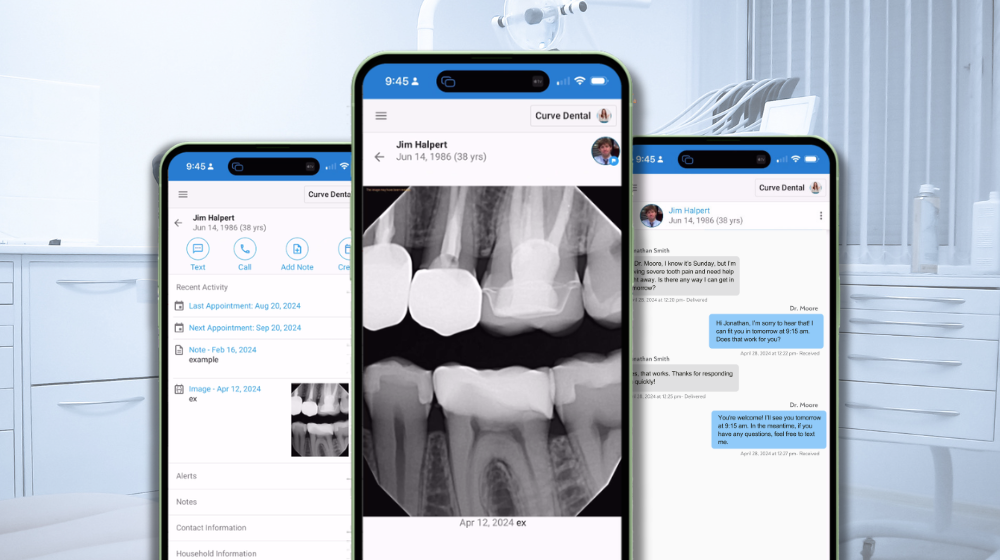
In modern dental practices, access to patient data and communication tools is no longer confined to a desktop workstation. Providers move between operatories, team members step away from the front desk, and leadership often requires visibility outside the office to maintain operational continuity.
Mobile dental practice management is no longer a convenience layer; it is an operational extension of the cloud-native practice environment. As coordination demands increase, the ability to securely access schedules, patient records, and communications in real time directly influences workflow stability and team responsiveness.
While browser-based mobile access can provide basic functionality, it was not designed for the interruption-driven realities of clinical workflows. This distinction becomes increasingly important as practices evaluate how their technology supports real-time decision-making, security, and communication across the day.
The Operational Limitations of Browser-Based Mobile Access
Mobile browsers technically allow login to cloud platforms, but they introduce structural inefficiencies that are often overlooked during system evaluation. These limitations rarely appear as obvious failures; instead, they surface as small delays and workflow interruptions that accumulate over time.
Common friction points include:
-
Session timeouts during active workflow
-
Pinch-to-zoom navigation through schedules and charts
-
Delayed message visibility without real-time alerts
-
Manual refresh cycles to check updates
-
Potential caching of patient data in browser history
For dental teams managing schedule changes, patient messages, and clinical documentation, even minor interface friction increases coordination load. Over the course of a full clinical day, these micro-delays translate into slower response times and fragmented communication.
Native Mobile Design as Workflow Infrastructure
Within mobile dental practice management environments, native functionality is designed to support high-frequency, real-time workflows rather than occasional viewing.
Native capabilities such as push notifications for patient responses and schedule changes, and direct viewing of incoming patient photos within the chart reduce the need to switch between multiple systems. This allows teams to act immediately rather than defer tasks until they return to a workstation.
From an operational perspective, this shift reduces task fragmentation and improves communication continuity across clinical and administrative roles.
Interface Design and Its Impact on Coordination Load
Desktop platforms are optimized for large screens and mouse navigation. When accessed through a mobile browser, dense schedules, clinical notes, and patient records often require repeated zooming, scrolling, and reorientation.
A mobile-first interface restructures information for touch navigation and vertical viewing, allowing faster interaction during busy clinical hours. Touch-optimized buttons, reformatted appointment views, and streamlined chart access reduce the interaction time required per task.
This usability difference may seem minor in isolation, but across dozens of daily interactions, it contributes to measurable workflow efficiency and lower cognitive load for team members.
Security and HIPAA Considerations in Mobile Access
Security architecture is a critical factor when evaluating mobile dental software. Browser environments may retain cached data, open tabs, or session artifacts, increasing exposure risk when devices are shared or left unattended.
In high-compliance healthcare environments, unsecured mobile workarounds can introduce both privacy risk and operational inconsistency. When browser access feels cumbersome, teams may default to personal texting or unsecured communication channels, creating additional compliance concerns.
A native mobile application operates within a controlled environment that automatically logs out after inactivity, prevents patient data from being stored in browser caches, and supports secure, HIPAA-aligned communication through integrated messaging tools. This reduces reliance on external apps and reinforces data governance standards.
Speed, Responsiveness, and Real-Time Decision Support
Mobile responsiveness directly affects patient communication and internal coordination. In fast-paced dental settings, delayed access to records, images, or messages can slow decision-making and disrupt patient flow.
Optimized image performance enables faster loading of radiographs, X-rays, and patient photos, even on mobile networks. This supports quicker clinical review and more efficient collaboration between providers and team members, especially in multi-doctor or multi-location practices.
A Practical Evaluation Lens for Dental Leaders
As dental practices assess practice management technology in 2026, mobile access should be evaluated as part of the broader operational infrastructure rather than a secondary convenience feature.
Key evaluation questions include:
-
Does mobile access support real-time patient communication?
-
Is the interface designed for clinical workflows or adapted from desktop layouts?
-
How is patient data secured on mobile devices?
-
Can providers take action—not just view information—while offsite?
These considerations shift the discussion from usability preference to system readiness and workflow resilience.
Mobile Access as an Extension of the Cloud-Native Environment
Within a cloud-native platform, such as Curve, mobile functionality operates as a true extension of the unified data environment rather than a limited viewer interface. Team members can access schedules, patient records, images, and communication tools in real time without relying on browser workarounds or fragmented applications.
Modern mobile functionality is no longer limited to viewing information. It enables real-time interaction with patient data, schedule adjustments, clinical notes, and care coordination regardless of location.
For practices navigating staffing constraints, rising communication expectations, and increasing coordination demands, native mobile dental practice management capabilities are becoming a structural requirement for maintaining workflow continuity, secure communication, and operational clarity.
Next Step: We can help you evaluate how native mobile access functions within a unified, cloud-native dental practice management environment.